The Evolution of USB Ports: From USB 1.0 to USB-C
The world of connectivity has vastly transformed since the introduction of USB 1.0 in 1996. Initially designed to streamline the connection of peripherals, it offered a maximum transfer speed of 1.5 Mbps. As technology evolved, so did USB, with subsequent versions introducing crucial upgrades. USB 2.0, released in 2000, brought significant improvements, increasing data transfer speeds to 480 Mbps and enabling the connection of multiple devices through hubs. This evolution continued with USB 3.0, which emerged in 2008, allowing for a staggering transfer speed of 5 Gbps, further enhancing the user experience and device compatibility.
As we moved into the 2010s, the release of USB-C marked yet another pivotal shift in USB technology. Featuring a reversible connector and supporting multiple protocols, USB-C not only improved user convenience but also enhanced power delivery capabilities, enabling charging for a wide range of devices, from smartphones to laptops. This versatile standard allows for faster data transfer rates, reaching up to 40 Gbps with USB 4.0. Its growing adoption reflects the industry's commitment to standardization and efficiency, paving the way for future innovations in connectivity.
If you're looking to combine style and functionality in your bedroom, consider exploring the Top 10 Nightstands with Charging Stations. These nightstands not only provide essential storage but also feature built-in charging capabilities to keep your devices powered and within reach. With designs ranging from modern to traditional, there’s a perfect option for every aesthetic and need.
How USB Ports Revolutionized Digital Connectivity
The advent of USB ports marked a significant turning point in the world of digital connectivity. Before their introduction, users faced a daunting array of cables and connectors, each designed for a specific device. With the standardized USB (Universal Serial Bus) interface, connecting multiple devices—from printers to keyboards and external drives—became a seamless experience. This single port eliminated the confusion of compatibility issues and paved the way for a more unified approach to device connectivity, enhancing user experience and promoting technological innovation.
Beyond mere convenience, USB ports have revolutionized data transfer speeds and power delivery. The evolution from USB 1.0 to USB 4.0 has brought about dramatic improvements, allowing for transfer rates that can exceed 40 Gbps, which is crucial for high-definition media and large file transfers. Additionally, the ability to deliver power through these ports has facilitated the charging of smartphones, tablets, and laptops without the need for separate chargers. This versatility not only simplifies our digital lives but also supports the growing trend of minimalist technology—where fewer cables and devices contribute to a cleaner, more efficient workspace.
What You Need to Know About USB Port Types and Their Uses
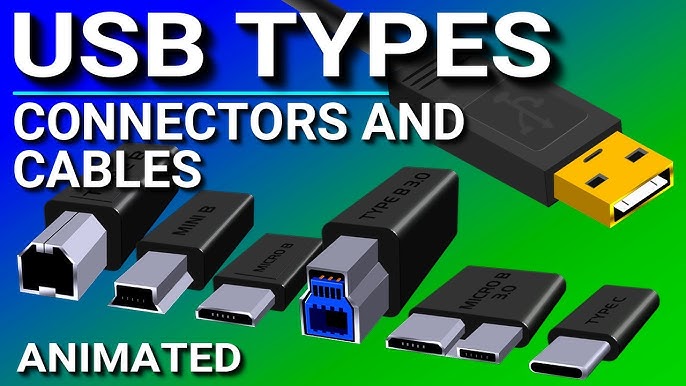
Understanding the various USB port types is crucial for anyone who wants to make the most of their devices. The most common types include USB Type-A, USB Type-B, USB Type-C, and Micro USB. USB Type-A is the standard rectangular connector found on most computers and chargers, while USB Type-B is typically used for printers and larger devices. The newer USB Type-C offers a reversible design and faster data transfer speeds, making it increasingly popular for smartphones, laptops, and tablets. Lastly, Micro USB is often used for older smartphones and some peripherals.
Each USB port type serves specific functions and has unique advantages. For instance, USB Type-C not only supports higher power delivery but also facilitates faster data transmission. When selecting cables and connectors, consider the compatibility with your devices and the kind of data transfer speed you require. Additionally, it’s essential to note that while many devices still rely on USB Type-A and Micro USB, transitioning to USB Type-C can future-proof your tech setup. To summarize, knowing the distinctions and applications of each USB type will equip you with the knowledge to make informed decisions regarding your electronic devices.